
merchant_guide:manage-subscriptions-locate
Managing Subscriptions: Locate a Subscription
How to locate a subscription
There are several ways to locate a subscription:
- Subscriptions menu
- Click on “My Stores” in top navigation, then select the store that you are working with
- Click on “Subscriptions”
- To locate a subscription, browse through the pages, or click on the plus sign next to “Search” to view advanced search filters
- When you locate the subscription that you are looking for, click on the Subscription ID to view the subscription summary page
- Quick Search
- In the top-right corner of the SubscriptionBridge Merchant Center interface, there is a “Quick Search box
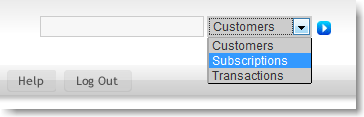
- You can use it to search customers, subscriptions, and transactions. Specifically:
- When you search for “Customers”, you can search using:
- Store name
- Company name
- First name
- Last name
- Email Address
- When you search for “Subscriptions”, you can search using:
- Subscription ID
- Customer name
- More filters coming soon
- When you search for “Transactions”, you can search using:
- Store name
- More filters coming soon

Related articles
merchant_guide/manage-subscriptions-locate.txt · Last modified: 2010/03/18 14:13 by earlyimpact